HEAD TO HEAD
Vugola vs Opus Clip
The same source, the same export target, and a cost comparison that counts usable clips.
By Christopher Brown · Last updated · Hands-on test: October 19, 2026 · Provisional scores: Opus Clip 73.5, Vugola 51.6 · How we test
Test status Full protocol (comparable)
Round-one results (October 19, 2026)
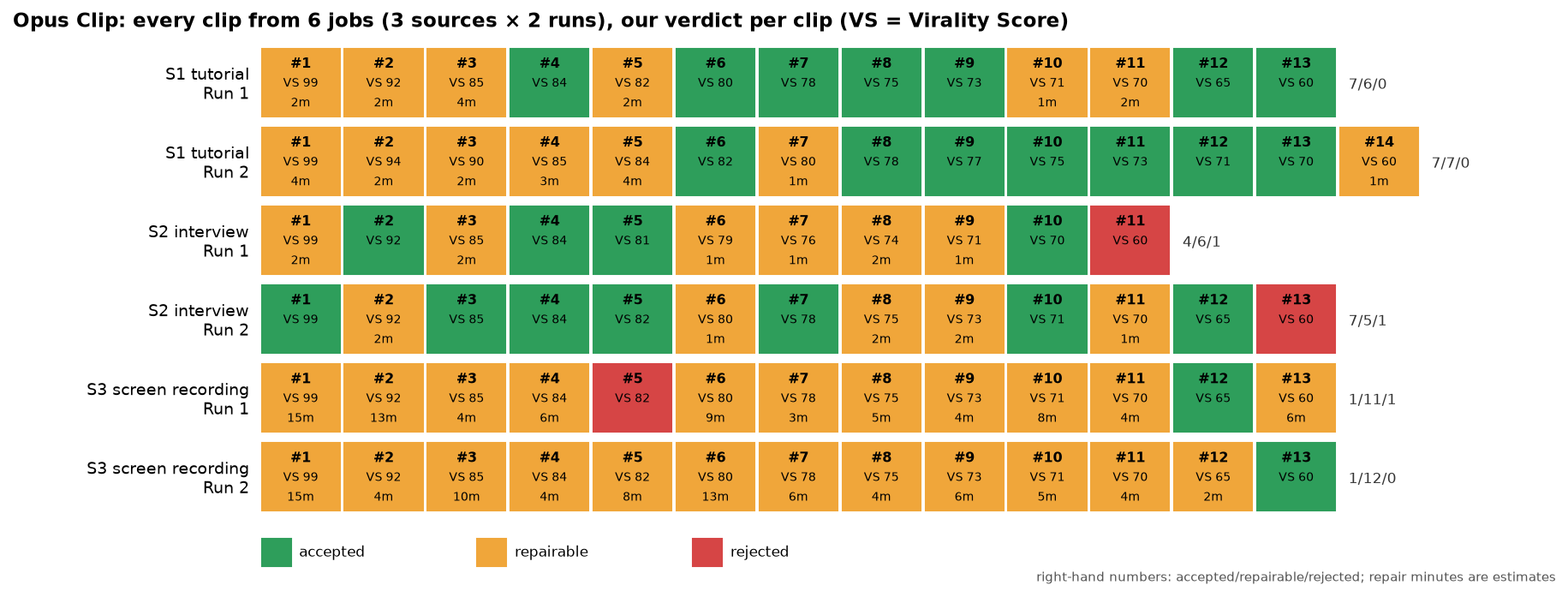
Opus Clip won the head-to-head on clip quality, automation, value and usability; Vugola won on caption accuracy. Opus Clip produced five times as many clips, and a third of them were publishable as delivered. Every Vugola clip needed a fix.
How this test was run: one tester, on October 19, 2026. Three rights-cleared sources, each trimmed to 6:58 (a single-speaker talk with slides, a two-person interview, a Chrome DevTools screen recording), run twice per tool: 6 jobs per tool, 12 in total. Same files, 9:16, default model, full timeframe, no prompt. Vugola ran on a paid Starter month. Every clip was logged as accepted (publishable as delivered), repairable (usable after a fix) or rejected. Repair minutes are estimates, not timed edits. Full rules: how we test. Published by Scrutator Team, Hong Kong.
| Measure | Opus Clip | Vugola |
|---|---|---|
| Clips generated | 77 (12.8 per job) | 15 (2.5 per job) |
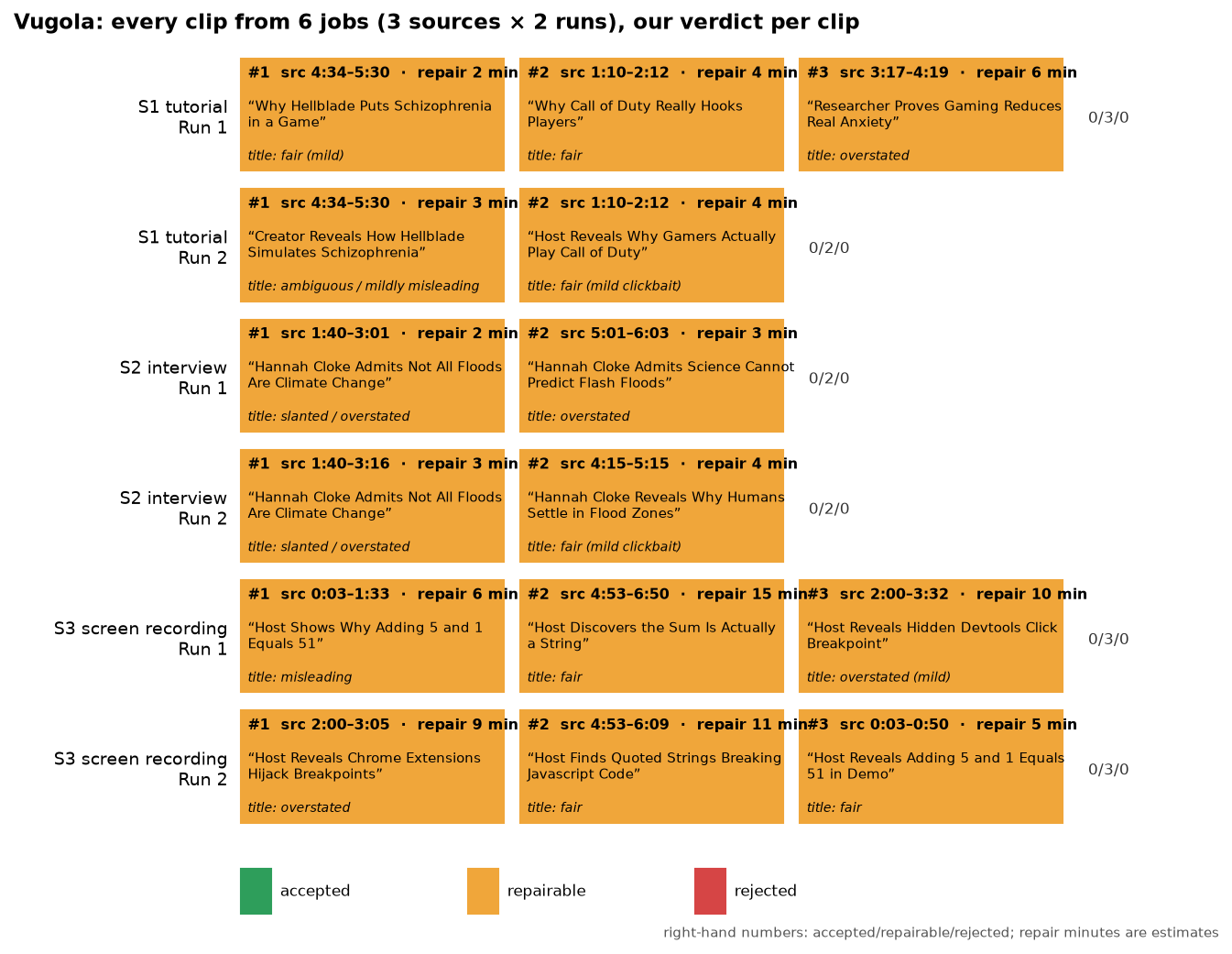
| Accepted / repairable / rejected | 27 / 47 / 3 | 0 / 15 / 0 |
| Estimated repair time | 205 min (4.4 per repairable clip) | 87 min (5.8 per repairable clip) |
| Caption error rate vs. checked transcript | 0.98% (122 errors in 12,469 words) | 0.28% (4 in 1,421 words; second run only) |
| Errors on names and terms | 21 of 406 | 1 of 44 |
| Subject or demo out of frame | 181 s | 8 s, plus 354 s of screen recording shown as an unreadable band |
| Watermark | Yes (removed on paid plans) | None (Starter) |
| Credits used | 36 (6 per job) | 42 (7 per job) |
By source
| Source | Opus Clip | Vugola |
|---|---|---|
| Tutorial (talk with slides) | 27 clips: 14 / 13 / 0, 30 repair min | 5 clips: 0 / 5 / 0, 19 repair min |
| Two-person interview | 24 clips: 11 / 11 / 2, 17 repair min | 4 clips: 0 / 4 / 0, 12 repair min |
| Screen recording | 26 clips: 2 / 23 / 1, 158 repair min | 6 clips: 0 / 6 / 0, 56 repair min |
Both tools found complete ideas in the tutorial and the interview. Both failed the screen recording in the same way: the code is not readable once the screen is squeezed into 9:16, so nearly every clip from that source needed reframing. In one wide interview shot both tools framed the interviewer while the guest was speaking.
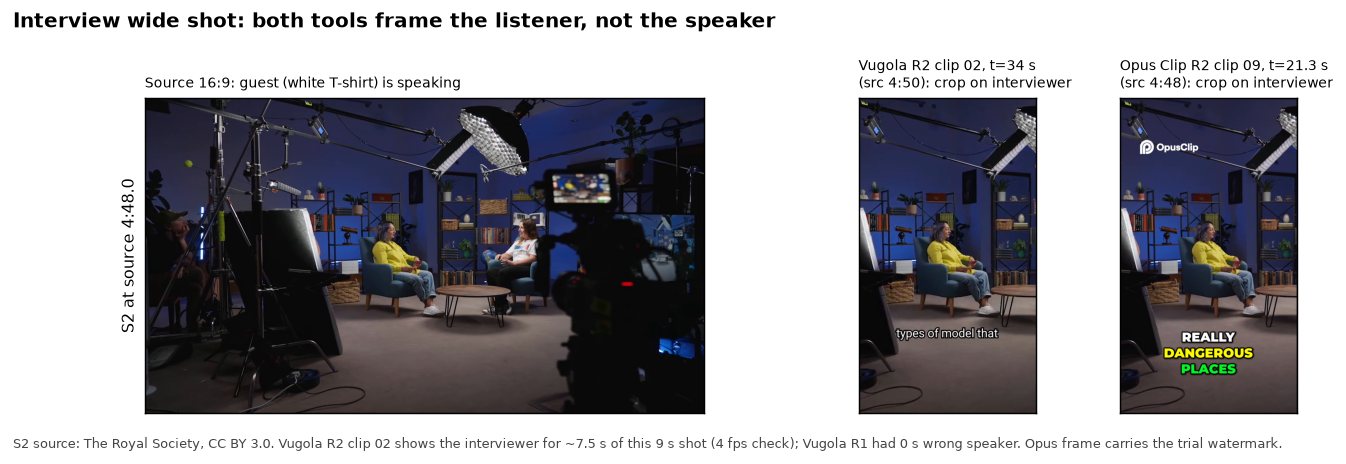
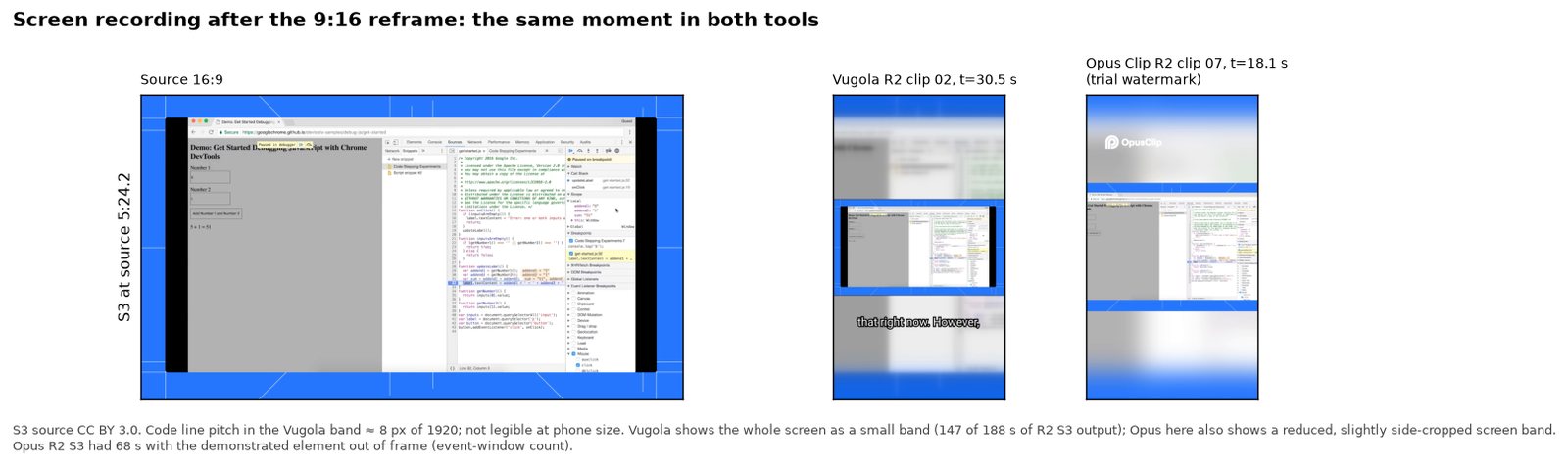
Frames from “How can video games boost your mental health?” by Universiteit van Nederland (Dr Max Birk), “Extreme weather with Hannah Cloke” by The Royal Society and “Debugging JavaScript - Chrome DevTools 101” by Google Chrome Developers, all CC BY 3.0; trimmed; clips generated by Vugola and Opus Clip.
Cost per clip
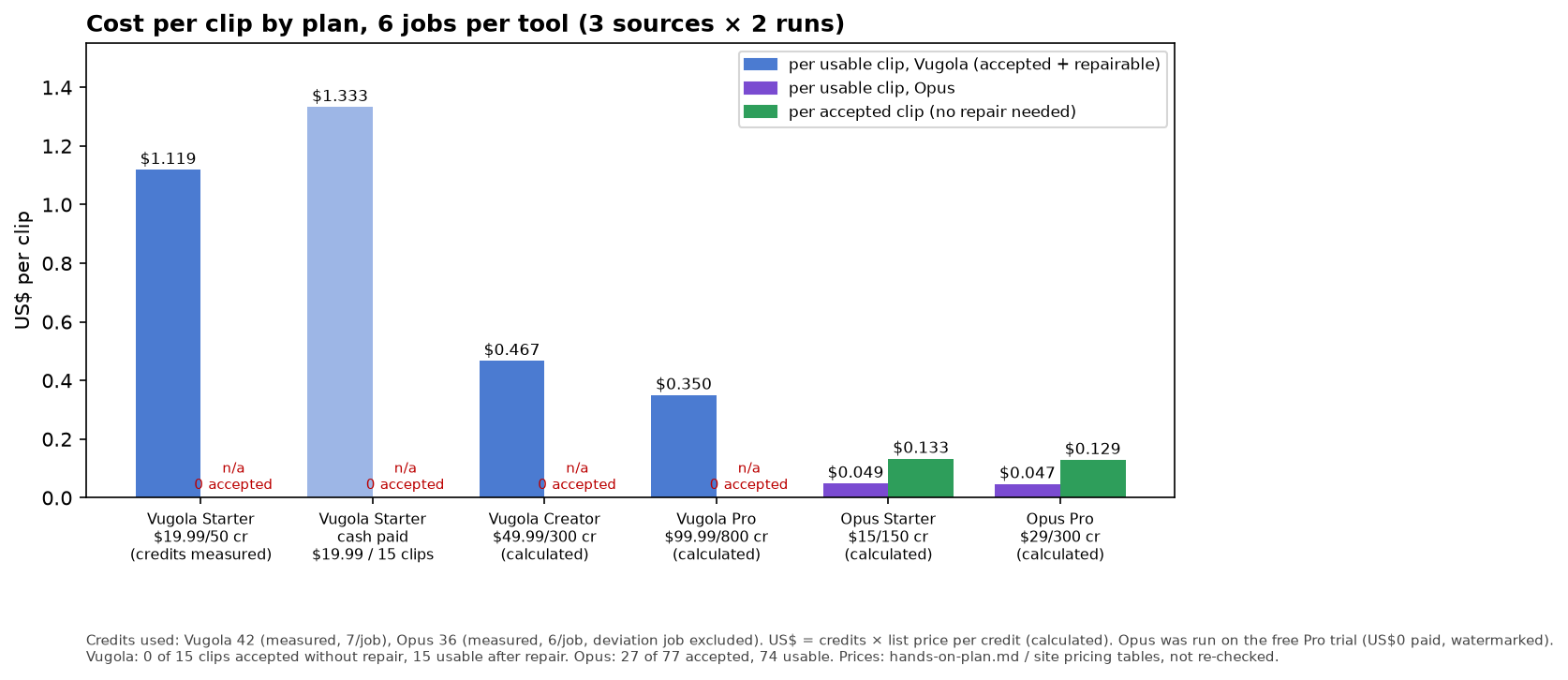
On the Starter plan we used, the six Vugola jobs cost $16.79 in credits (42 credits) or $19.99 in cash with 8 credits unused; none of the 15 clips was accepted as delivered, so a cost per accepted clip cannot be calculated, and the cost per usable clip was $1.119 on credits used or $1.333 in cash. The same six jobs would have cost $3.60 on Opus Clip Starter ($0.133 per accepted clip, $0.049 per usable clip) or $3.48 on Opus Clip Pro ($0.129 and $0.047). The full plan-by-plan table, including Vugola Creator and Pro, is on Vugola pricing.
Scores and how we calculated them
| Dimension (weight) | How we scored it in this round | Opus Clip | Vugola |
|---|---|---|---|
| Clip quality (30) | Average per clip: accepted 10; repairable 8, 6, 4 or 2 as the estimated fix grows (≤2, 3–5, 6–10, >10 min); rejected 0 | 7.30 | 5.20 |
| Caption accuracy (20) | 10 − 5 × error rate in %, minus 1 for a visible placement problem | 5.11 | 7.59 |
| Automation (20) | Share of clips that, without help, had a complete idea, a clean start, a clean end, preserved meaning and the subject in frame | 8.47 | 6.93 |
| Value (20) | Cost per usable and per accepted clip on the cheapest watermark-free plan, banded from $0.10 or less (10) to over $2 or none accepted (0) | 9.0 | 1.0 |
| Usability (10) | Seven-item checklist from the run log: defaults, job tracking, clip details, export path, job controls, credit transparency, interruptions | 6.43 | 5.00 |
| Weighted total | Weight × score ÷ 10, summed | 73.5 | 51.6 |
Provisional scores from one round of testing. The ranking holds even if Vugola is given full marks for value (69.6). Delivery to social accounts and failure recovery were not tested, so the automation score covers clip selection and framing only.
What else we noticed
- Opus Clip’s Virality Score did not predict our verdicts: the rank correlation was −0.12 in the first run and −0.10 in the second.
- Vugola’s titles editorialise; 8 of its 15 titles overstated, slanted or misled. Opus Clip’s captions mangled “Hellblade: Senua’s Sacrifice” in both runs; Vugola’s got it right.
- Run twice, Vugola picked nearly the same start points (6 of 7 second-run clips started at the same second as a first-run clip), but end points moved by up to 43 seconds.
- Vugola’s caption dialog preselected “No Captions” and its orientation dialog once defaulted to 16:9. Opus Clip’s speech-language default of Auto led to one accidental extra job, and survey pop-ups had to be dismissed during setup.
Limits of this test
- Small sample: 3 sources and 2 runs per tool, judged by a single reviewer against written rules.
- Opus Clip dollar figures are calculated from list prices.
- Vugola’s first run was submitted with “No Captions”, the option preselected in its dialog, so its caption figures cover the second run only (3 jobs, 1,421 words).
- One extra Opus Clip job, submitted with the speech language left on Auto by mistake, is excluded from every figure.
- Processing time could not be compared: neither tool shows a completion time. Opus Clip’s progress display put its first-run jobs at roughly 5–8 minutes; Vugola’s jobs could not be timed.
The comparison brief
Both tools receive the same three rights-cleared sources, the same target aspect ratio, and the same acceptance rubric. Run each source twice. Keep tool settings and subscription tier in the evidence record.
Separate generation from useful output
Report generated, accepted, repairable, and rejected clips separately. A larger output count can increase review work without improving the result. Record time from submission to available export and time spent fixing that export.
Do not compare credit counts directly
Convert actual charges to dollars within each plan, then divide by accepted outputs. Also show cash subscription cost at actual utilization. See Vugola pricing calculations.
The three sources, and what each one tests
The tutorial is a single speaker explaining a process; it tests whether a clip keeps the setup and the result together. The interview has two speakers and natural cross-talk; it tests whether an answer still makes sense without its question and whether reframing follows the person talking. The screen demonstration tests whether a vertical crop keeps the thing being explained readable. Results are reported per source, because one tool can win on talking heads and lose on screen recordings, and an average would hide exactly the difference a buyer needs to see.
How the result is reported
For each tool and source we publish generated, accepted, repairable and rejected counts; repair minutes per accepted clip; caption errors against a reference transcript; seconds with the subject out of frame; credits charged and refunded; and cost per accepted clip at actual utilization. Where the tools tie, we say so. Where one wins on one source and loses on another, the write-up explains which kind of creator that favours instead of naming a single winner.
Common ways a head-to-head goes wrong
- Feeding each tool a different source, or a cleaner cut of the same one.
- Comparing one tool’s default settings with the other’s tuned settings.
- Counting generated clips instead of accepted clips.
- Ignoring failed or retried jobs, which cost credits and time.
- Quoting vendor demo reels as if they were outputs from your footage.
Each of these flatters one side. The protocol in our testing methodology fixes them in advance, and the run log keeps every attempt, including the ones that produced nothing usable.
What each vendor documents today
Before any run, the published terms already differ in ways that decide which tool suits which buyer. Opus Clip facts were checked on October 11, 2026; Vugola facts come from our Vugola documentation review and were re-checked on the pricing page the same day.
| Area | Vugola | Opus Clip |
|---|---|---|
| Entry paid plan | Starter $19.99 / month, 50 AI credits | Starter $15 / month, 150 credits |
| Free plan | No free plan listed | Yes: 60 credits / month, watermark, 3-day export |
| Credit unit | AI credits; API reference quotes one per started source minute, job examples use wallet units | 1 credit per minute of source video |
| Annual billing | Annual discount advertised (save 20%) | Pro only, $14.50 / month billed $174 a year |
| API access | All paid plans | Pro (Beta) and Business; 900-credit monthly API cap on Pro Beta |
| MCP | Hosted OAuth and local key server | Hosted server with OAuth |
| Team seats | Connected accounts scale by plan (2, 4, unlimited) | Pro: 2 seats per pack, up to 4 |
On published terms alone, Opus Clip covers more source minutes per dollar at entry level, and Vugola gives API access on a cheaper tier than Opus Clip’s Pro. Neither statement says anything about which tool produces more publishable clips; that is what the matched runs are for.
Which one to trial first
- Leaving the web app is the point (agents, schedulers, n8n): start with Vugola and the Opus Clip API on the same job, and record unattended failures.
- You clip long podcasts or streams by hand today: start with Opus Clip’s free plan; it costs nothing to see whether selection fits your content. See Is Opus Clip free?
- Budget is the constraint: compare cost per accepted clip using Opus Clip pricing and Vugola pricing, not credit counts.
- Neither fits: the Opus Clip alternatives comparison covers seven more tools.
Evidence required for a verdict
- Matched exports and redacted job records: done for round one.
- Caption error and framing review: done (Vugola captions from the second run only).
- Successful delivery and failure recovery: not tested yet.
- Pricing evidence and a complete score breakdown: done, with dollars calculated from list prices.
Until delivery and recovery are tested, the scores above are provisional. We do not turn vendor feature descriptions into scores.
Frequently asked questions
Which tool wins on quality?
Opus Clip, in our October 19, 2026 test: 27 of its 77 clips were publishable as delivered, against 0 of Vugola’s 15. Vugola had the more accurate captions, 0.28% errors against 0.98%.
How were captions compared?
Against the same manually checked transcript, counting substitutions, deletions and insertions, with names and product terms counted separately.
How was price compared?
We converted the credits each tool actually charged into dollars at each plan’s list price per credit, then divided by accepted clips and by usable clips. The dollar figures are calculated.
Are vendor virality scores comparable?
We do not treat vendor-generated scores as independent evidence of performance.
Is Opus Clip cheaper than Vugola?
On published entry prices, yes: Opus Clip Starter was $15 a month for 150 credits and Vugola Starter $19.99 for 50 AI credits on October 11, 2026. In our test Opus Clip was also cheaper per usable clip: $0.049 on Starter against $1.119 for Vugola Starter, calculated from the credits used.